


Shopping for farm supplies, workwear, pet essentials, or everyday outdoor gear is usually less about browsing for fun and more about finding the right item before the next chore starts. I spent time using Tractor Supply Company as a mobile shopping app, and I found that its main value comes from putting a large retailer’s catalog into a workflow that can be handled from the phone. It is free, aimed at Everyone, and developed by Tractor Supply Company, so it is clearly built for practical shopping rather than casual browsing.
My overall impression is positive, but with an important qualification: this is most useful when Tractor Supply is already one of your regular stores. If you are trying to compare every retailer for the lowest possible price, a general shopping search tool may be better. If you already know the kind of supplies you need, want to check products while away from a computer, or prefer preparing a store visit before driving out, the app becomes much more worthwhile.
How I use the app for a dependable shopping routine
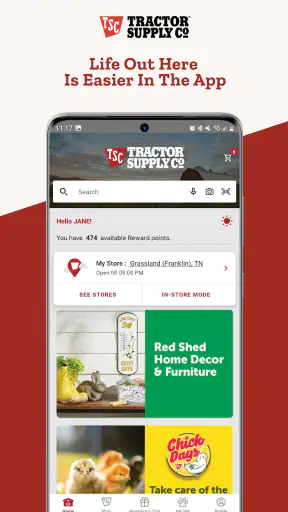
My baseline workflow starts with a specific need rather than opening the app to wander through categories. For example, if I need animal-care supplies, a replacement tool, or clothing for outdoor work, I search for the item first and then narrow my attention to the product details. This is faster than scrolling through a broad department, especially when the catalog contains several versions of what sounds like the same product.
I found it helpful to treat the first search result as a starting point, not an automatic choice. Product names can look similar while differing in size, material, intended animal, or use. I read the description carefully, check the available options, and look at customer feedback before adding anything. That extra step matters more for supplies where an incorrect size or unsuitable specification can make a purchase useless.
The app is also convenient when I am planning a mixed basket. A typical trip might include feed-related items, work gloves, a household product, and something for a pet. Instead of writing separate notes and searching at the store, I can collect the items in one place first. That reduces the chance of forgetting a small but important item, particularly when the main purpose of the trip is something time-sensitive.
For store visits, I use the app as a preparation tool rather than assuming it replaces the physical shopping experience. I check the item online, confirm the details that matter, and then use the app to guide the visit. This is a useful distinction: the app can make a trip more focused, but I still want to verify the actual product when condition, fit, texture, or exact physical size matters.
One practical habit is to separate “need now” items from “compare later” items. I keep the urgent purchase focused and avoid filling the basket with tempting extras before I have checked the essential product details. That makes the checkout process easier to review and helps prevent a rushed order from containing the wrong variant.
The app has a solid audience already, with more than a million installs and an average rating of 4.0 from roughly nineteen thousand ratings. Those figures suggest a mature, widely used shopping tool, although they should not be mistaken for a guarantee that every phone or every shopping trip will feel flawless. In my experience, the usefulness depends heavily on how deliberately I search and verify items.
What I check before placing an order
I pay attention to three things before committing: the exact product variation, the quantity, and the practical reason I need it. This sounds obvious, but retail apps make it easy to move quickly from a search result to a basket. A product that looks right in a thumbnail may not be right for the task once the full description is considered.
I also review the basket from the perspective of the job I am preparing for. If I am buying equipment for outdoor work, I ask whether I have chosen the correct size and whether I need a companion item that is genuinely necessary. If I am buying for an animal, I double-check that the product matches the animal and purpose rather than relying on a familiar brand name.
That workflow is one of the app’s strongest qualities: it gives me a practical place to prepare, review, and organize a purchase. It is less impressive when I expect it to make every decision for me. The app can present products, but my judgment is still needed for compatibility, suitability, and value.
Settings and habits worth checking before regular use
I do not recommend treating the first session as the final setup. Before using the app regularly, I check the account and shopping preferences available on my device, then make sure my basic information is accurate. A small mistake in saved details can create unnecessary friction later, especially when I am ordering in a hurry.
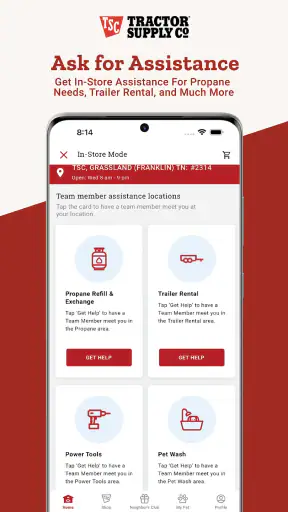
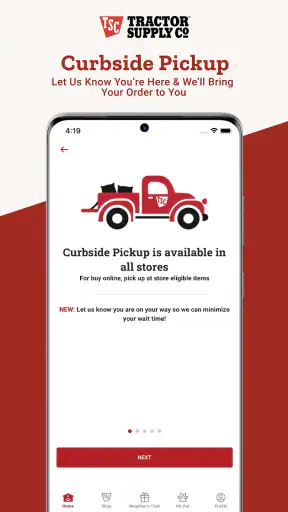
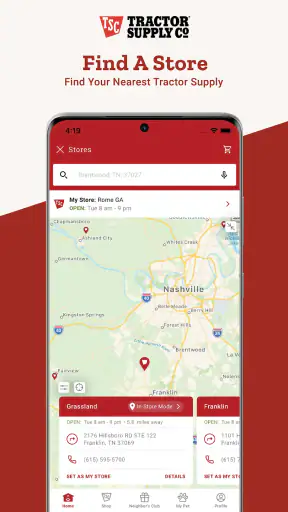
I also check how the app handles store-related choices and delivery or collection decisions during the shopping process. These choices can affect which products make sense for a particular trip. A product that is convenient for a planned store visit may not be equally convenient when I need delivery, and the reverse can also be true. I prefer deciding the shopping method early instead of discovering at the end that my basket needs adjustment.
Notifications deserve a deliberate approach. I do not want every retail message competing with work and personal alerts, so I keep only the notifications that help me act on a purchase or remember an important shopping task. If the available controls on a device are limited, I use the phone’s notification settings rather than allowing the app to become noisy.
It is also worth checking the app version before troubleshooting. The current version is 1.69.6, and the app supports Android 7.0 or later. That broad Android compatibility is useful for people who keep an older phone for work, travel, or outdoor use. Still, older hardware can make image-heavy shopping pages feel less comfortable, so I would keep the operating system and the app updated where possible.
On iPhone or Android, I recommend giving the app a clean test before relying on it for an urgent purchase. Search for a familiar product, open the details, build a small basket, and move through the process far enough to understand the available choices. That short rehearsal reveals whether the text is comfortable to read, whether your preferred shopping method is easy to select, and whether your phone handles the app smoothly.
One advanced but simple habit is to avoid changing several shopping decisions at once. I choose the store or fulfillment approach, then review the basket, then make any substitutions or quantity changes. Doing everything in one rushed pass makes it harder to spot an accidental change. A staged review is slower by a minute but more reliable for a large or mixed order.
Why the phone matters in this category
A desktop browser is still better for some tasks. A larger screen makes side-by-side comparison easier, and a physical keyboard can be more comfortable when I am searching for a precise model or a long product name. The mobile app wins when I am already in the garage, barn, yard, or vehicle and want to check an item without returning to a computer.
That mobile context changes how I use it. I am not usually conducting a long research session on the phone. I am checking a product while measuring a space, confirming what I wrote on a list, or preparing a store run. The app feels most natural in those short sessions, where speed and access matter more than a wide desktop layout.
I would not install it solely because it is free. Free is helpful, but the real question is whether Tractor Supply Company is part of your normal purchasing routine. For regular customers, the app can reduce repeated searching and make shopping more organized. For occasional visitors, a mobile browser may be enough and may avoid adding another app to the phone.
Faster patterns that save time without creating mistakes
Experienced use is less about tapping quickly and more about repeating a reliable sequence. My preferred pattern is search, inspect, compare variations, add, and review. I avoid jumping between unrelated departments until the first task is settled. This keeps the app from turning a short supply run into an unstructured browsing session.
When I need several items, I group them by the job they support rather than by the order in which I remember them. For example, I may first gather everything needed for animal care, then work clothing, then household or outdoor maintenance items. This mental grouping makes the final review more useful because I can ask whether each task is actually covered.
Another useful pattern is to search with the words I would use in a conversation, then refine the result using the product’s own terminology. Starting too broadly can produce a crowded result set, but starting with an overly technical phrase can miss an item described in simpler retail language. I try one natural search first, inspect the wording used by the relevant products, and then use those terms to narrow the next search.
I also read reviews for specific evidence instead of looking only at the average sentiment. I want to know whether people mention fit, durability, ease of use, or a mismatch between the listed purpose and real-world use. Customer reviews are most valuable when they answer the exact question I have, not when they merely confirm that people generally liked the item.
A less obvious time saver is taking a pause before the final order review. I put the phone down briefly, then return to the basket as if I were checking someone else’s work. This catches duplicate items, the wrong size, and products added during a distracted browsing moment. It is especially useful when the basket contains several inexpensive items, because small errors are easy to overlook.
For repeat purchases, I keep a personal note of the exact product description and variation that worked. I do not rely on memory alone, particularly for items that look nearly identical. When I return to the app, that note gives me a precise search target and reduces the temptation to choose a similar-looking replacement without checking it.
Where it compares well with ordinary alternatives
Compared with walking into the store without preparation, the app gives me a better way to think through the purchase before I leave home. I can assemble a focused list, inspect product information, and avoid spending the first part of the visit trying to remember what I needed. That is its clearest advantage over an unplanned store trip.
Compared with a general marketplace, its strength is focus. I am looking through Tractor Supply’s own shopping environment rather than mixing listings from unrelated sellers and categories. That can feel simpler when I already want this retailer, although a general marketplace may offer broader comparison across brands and sellers.
Compared with a mobile browser, the dedicated app is more convenient for repeated use because it keeps the shopping experience in one place. The browser remains a sensible alternative for a one-time purchase, for people with limited phone storage, or for anyone who dislikes managing multiple retail apps. I would choose the app for routine shopping and the browser for occasional, lightweight access.
Price comparison is the main reason I would not use it as my only shopping tool. If the item is expensive, specialized, or available from many retailers, I compare elsewhere before deciding. The app is excellent for organizing a Tractor Supply purchase, but it is not a substitute for independent comparison when the lowest total cost is the priority.
Advanced limits and situations where I would skip it
The biggest limitation is that convenience can encourage overconfidence. Seeing a product in a polished listing does not tell me everything I need to know about fit, feel, durability, or suitability for a particular setup. For tools, clothing, animal products, and equipment, I still use the description and reviews carefully, and I inspect the physical item when the purchase depends on its exact characteristics.
Another limitation is the small-screen format. Detailed comparisons can become tiring when several products differ only in a few specifications. If I am making a high-consequence choice, I prefer a larger screen or a written comparison rather than relying on quick taps through similar listings.
I would also skip the app when I need a product immediately and have not confirmed the practical shopping route. A mobile listing may help me identify the item, but it does not remove the need to understand whether the purchase fits my timing and plans. For urgent needs, I use the app to check first, then make a clear decision instead of assuming that finding a listing automatically solves the problem.
People who rarely shop at Tractor Supply may find the app unnecessary. Installing it, managing another account, and learning another retail interface may not be worth it for a single visit. In that situation, a browser or direct store visit is probably simpler. The app rewards repetition, so its value grows when the same kind of shopping happens regularly.
I would also avoid using it as a replacement for expert advice when the product choice involves animal health, safety, or a technical installation. The app is a shopping tool, not a professional consultation. It can help me locate and organize products, but the responsibility for choosing an appropriate item remains with me and, where relevant, a qualified professional.
How I keep the experience dependable
I use a short checklist before completing a purchase: correct product, correct variation, correct quantity, suitable timing, and a final basket review. This is not a feature claim about the app; it is a repeatable habit that makes the app more dependable. The interface helps with the shopping process, but the checklist prevents rushed decisions.
I also keep the app updated and pay attention to how it behaves after an operating system update. If a page loads slowly or a step feels unclear, I retry with a stable connection and check that the app is current before assuming the problem is with the product or order. For important purchases, I do not wait until the last possible moment to begin.
Privacy and account comfort are personal considerations too. I prefer reviewing the permissions and notification controls on my phone, then enabling only what supports my shopping routine. Someone who wants a minimal digital footprint may reasonably choose the browser instead. Someone who wants a repeatable mobile workflow may find the convenience worth it.
My verdict after building a repeatable routine
Tractor Supply Company is a practical shopping app rather than an app I would open for entertainment. Its value appears when I use it with a plan: identify the job, search for the right product, inspect the details, organize the basket, and review everything before committing. That approach makes it more useful than simply browsing until something looks familiar.
The app is free, carries an Everyone age rating, and has been available since July 7, 2020. Its current version is 1.69.6, and the Android requirement of 7.0 or later makes it accessible to many older devices. I see those as helpful basics, but the stronger reason to use it is the way it supports repeat shopping for the retailer’s particular range of farm, outdoor, work, pet, and household needs.
My recommendation is strongest for regular Tractor Supply customers, people who prepare store trips in advance, and anyone who often remembers a needed item while already away from a computer. I would be more cautious for occasional shoppers, strict price comparers, and anyone making a technical or safety-sensitive purchase without additional research.
After using it with the habits above, I see the app as a dependable companion for organized shopping, not a magic shortcut. The best results come from combining the app’s product access with careful verification and a repeatable review routine. If that matches the way you shop, Tractor Supply Company is worth keeping on your phone. If you only need a one-off item or want the broadest possible comparison, a browser or general marketplace may be the better choice.


